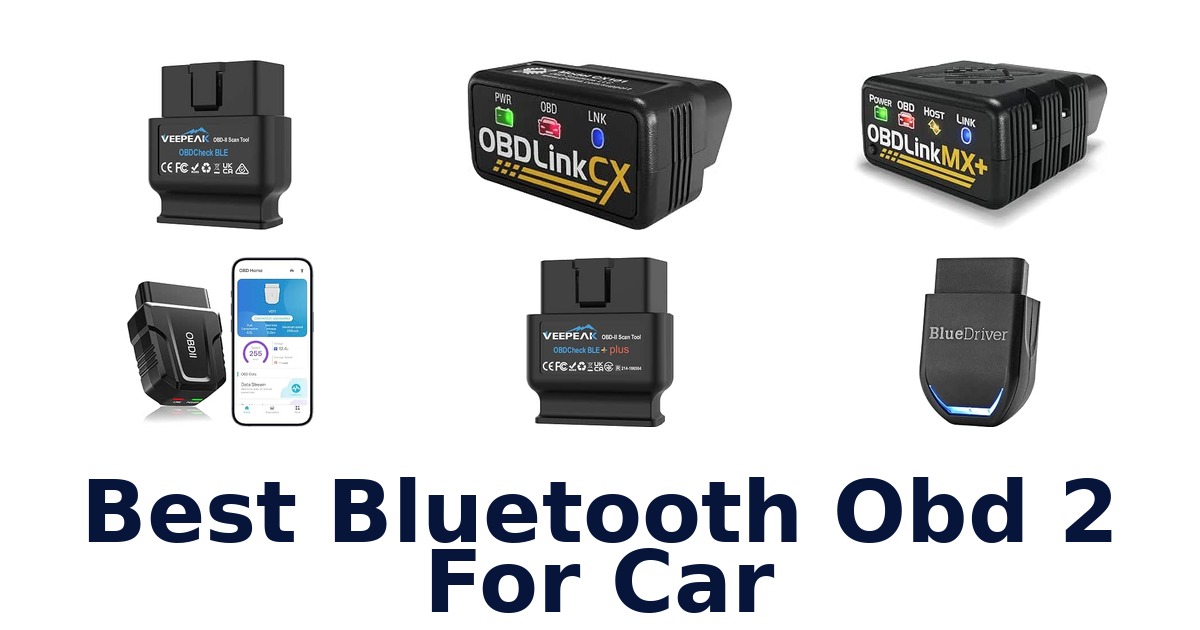
Best Bluetooth Obd 2 For Car options deliver convenient phone-based code reading and live vehicle data for drivers who want simpler everyday diagnostics. The right choice depends less on Bluetooth alone and more on app support, vehicle coverage, diagnostic depth, and how the adapter handles power when left connected. Generic scanners can read check-engine information, while enhanced models may access systems such as ABS, SRS, TPMS, or transmission data on supported vehicles.
Some adapters require a separate third-party app, and certain tools are limited by region or brand. This roundup compares ten options, including compact Veepeak adapters, professional-oriented OBDLink models, app-based scanners, a standalone ANCEL reader, and devices with battery-conscious sleep features.
The Best Bluetooth Obd 2 For Car depends on the vehicle and the diagnostics you need. Veepeak OBDCheck BLE and BLE+ suit standard check-engine codes, freeze-frame data, readiness checks, and live sensors through a compatible app. BlueDriver, OBDLink MX+, and BLCKTEC 430 offer broader enhanced-system coverage on supported vehicles.
OBDLink CX targets BMW and Mini coding with BimmerCode, while ANCEL AD310 is a wired, screen-equipped alternative rather than a Bluetooth adapter. Check app, vehicle, region, and system compatibility before buying.
Comparing the Best Bluetooth OBD 2 For Car Options
| Image | Product | Buy |
|---|---|---|
Best Pick 1  | Veepeak OBDCheck BLE Bluetooth OBD II Scanner for iOS & Android, Car Wireless Check Engine Light Code Reader Diagnostic Tool Best for: Basic iOS/Android Brand: Veepeak | Included Components: OBD-II Scanner, mini carrying case and user instructions | View on Amazon |
Best Pick 2  | BlueDriver OBD2 Scanner Bluetooth, No Subscription, ABS SRS TPMS Best for: Comprehensive Diagnostics Brand: BlueDriver | Included Components: BlueDriver OBD2 Scanner, access to BlueDriver App on iOS or Android | View on Amazon |
Best Pick 3  | OBDLink MX+ OBD2 Bluetooth Scanner for iPhone, Android, and Windows Best for: Pro-Level iOS/Android Brand: OBDLink | Included Components: Compliance Insert, Quick Start Guide, Scanner, Warranty Card, Zipper Case | View on Amazon |
Best Pick 4  | FIXD Bluetooth OBD2 Scanner – Car Diagnostic Check Engine Code Reader Best for: Simple Check Engine Brand: FIXD | Included Components: FIXD mobile app, OBD2 Scanner | View on Amazon |
Best Pick 5 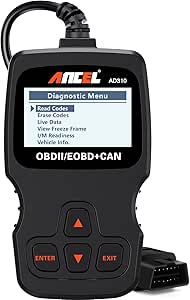 | ANCEL AD310 Classic Enhanced Universal OBD II Scanner Car Engine Fault Code Reader CAN Diagnostic Scan Tool, Read and Clear Error Codes for 1996 or Newer OBD2 Protocol Vehicle (Black) Best for: Universal Basic Scan Brand: ANCEL | Included Components: (No charger/adapter needed), 1* AD310 OBD2 Scanner, 1* User's Manual | View on Amazon |
How We Compared These Products
We compared dimensions, capacity, materials, compatibility, included components, and care requirements across many Amazon listings. These details matter because the product must fit the available space, intended use, setup requirements, and maintenance routine. After examining the wider field, we selected 10 products from Veepeak, BlueDriver, OBDLink, FIXD, ANCEL, UMEIJA, BLCKTEC, and Vgate.
The shortlist includes products such as Veepeak OBDCheck BLE Bluetooth OBD II Scanner for iOS & Android, BlueDriver OBD2 Scanner Bluetooth, and OBDLink MX+ OBD2 Bluetooth Scanner for iPhone. Every recommendation is tied to information stated for that specific product; unclear or missing features were treated as unknown rather than filled with assumptions.
Detailed Reviews: Best Bluetooth Obd 2 For Car
1. Veepeak OBDCheck BLE Bluetooth OBD II Scanner for iOS & Android, Car Wireless Check Engine Light Code Reader Diagnostic Tool
Best for: Basic OBD-II diagnostics.
The Veepeak OBDCheck BLE transforms your iOS or Android device into a diagnostic scan tool. It allows you to read and clear trouble codes for the check engine light, view freeze frame data, and monitor live sensor data. This compact scanner is designed for standard OBD-II functions, helping you understand your vehicle's health and diagnose common issues.
This wireless OBD-II scanner connects to your smartphone or tablet, turning it into a sophisticated diagnostic tool. It enables you to retrieve OBD fault codes and access real-time performance data, aiding in the diagnosis of check engine problems. The device's compact dimensions of 1.61"L x 1.97"W x 0.87"H make it easy to store. It comes with a mini carrying case and user instructions, and includes a 1-year manufacturer replacement warranty.
Product Details
| Brand | Veepeak |
|---|---|
| Included Components | OBD-II Scanner, mini carrying case and user instructions |
| Dimensions | 1.61"L x 1.97"W x 0.87"H |
| Manufacturer | Veepeak |
| Part Number | OBDCheck BLE |
| Manufacturer Warranty Description | 1 year manufacturer replacement warranty |
| Model Number | BLE |
Pros
- Read and clear check engine light codes
- View freeze frame data
- Access live sensor data
- Compatible with iOS and Android devices
Cons
- Does not support ABS/SRS or oil light resets
Ideal for car owners needing basic OBD-II diagnostics to check engine lights and monitor vehicle health. It requires a compatible third-party app and is best suited for generic OBD-II functions, not advanced system resets.
2. BlueDriver OBD2 Scanner Bluetooth, No Subscription, ABS SRS TPMS
Best for: Professional-grade diagnostics.
The BlueDriver OBD2 Scanner offers professional-grade diagnostics with the ability to read and clear enhanced codes for systems like ABS, SRS, and transmission. It connects wirelessly via Bluetooth to your iOS or Android device, providing comprehensive vehicle insights without any subscription fees. This tool empowers you to understand and address a wider range of vehicle issues.
This professional-grade scanner provides the capability to read and clear enhanced codes across multiple vehicle systems, including ABS, SRS, and transmission, offering deeper diagnostic insights than basic scanners. It integrates with the BlueDriver App, which features repair videos to guide you through common fixes and offers 24/7 in-app support. The scanner comes with access to the BlueDriver App for iOS or Android, and includes a 180-day money-back guarantee.
Product Details
| Brand | BlueDriver |
|---|---|
| Included Components | BlueDriver OBD2 Scanner, access to BlueDriver App on iOS or Android |
| Manufacturer | Lemur Vehicle Monitors |
| Part Number | LSB2 |
| Manufacturer Warranty Description | BlueDriver is pleased to offer a no-risk, 180-day 100% money back guarantee on all our products. If for any reason you are not completely satisfied with your purchase, you may return it within the first 180 days for a full refund (we will even pay return shipping)! BlueDriver will gladly accept defe |
| Model Number | Pro |
Pros
- Read and clear enhanced codes (ABS, SRS, Transmission)
- No subscription required
- Includes repair videos
- 24/7 in-app support
Cons
- Requires a compatible iOS or Android device
This scanner is perfect for DIY mechanics and car enthusiasts seeking advanced diagnostic capabilities for multiple vehicle systems. It's a powerful tool for troubleshooting complex issues, especially when paired with the app's educational resources.
3. OBDLink MX+ OBD2 Bluetooth Scanner for iPhone, Android, and Windows
Best for: Advanced diagnostics and coding.
The OBDLink MX+ OBD2 Bluetooth Scanner transforms your iPhone, Android, or Windows PC into a professional-grade diagnostic tool. It offers enhanced OEM support for major brands like Ford, GM, and Toyota, allowing you to clear check engine lights and access more live parameters, including ABS and SRS data, than many other scanners. Its speed and reliability make it a top choice for advanced users.
Transform your mobile device or PC into a professional diagnostic scan tool with the OBDLink MX+ adapter. It provides enhanced OEM support for Ford, GM, Mazda, Nissan, Toyota, and Honda vehicles, enabling you to clear check engine lights and access a wider array of live parameters such as ABS and SRS data. This adapter boasts over-voltage and battery drain protection, and receives firmware updates. Its compact dimensions are 2.01"L x 0.91"W x 1.81"H, weighing just 28g, and it includes a zipper case.
Product Details
| Brand | OBDLink |
|---|---|
| Included Components | Compliance Insert, Quick Start Guide, Scanner, Warranty Card, Zipper Case |
| Dimensions | 2.01"L x 0.91"W x 1.81"H |
| Item Weight | 28 g |
| Manufacturer | OBD Solutions, LLC |
| Part Number | 428101 |
| Manufacturer Warranty Description | https://www.obdlink.com/warranty/ |
Additional Product Information
| Model Number | MX201 |
|---|
Pros
- Professional-grade diagnostics for iOS, Android, Windows
- Enhanced OEM support for Ford, GM, Toyota, etc.
- Access to ABS, SRS, TPMS live parameters
- Over-voltage and battery drain protection
Cons
- Requires compatible third-party apps like FORScan or Torque
This high-performance scanner is recommended for enthusiasts and professionals needing deep diagnostic access and coding capabilities for specific vehicle makes. Ensure compatibility with your chosen diagnostic or coding app for optimal use.
4. FIXD Bluetooth OBD2 Scanner – Car Diagnostic Check Engine Code Reader
Best for: Simple check engine alerts.
The FIXD Bluetooth OBD2 Scanner is designed to simplify car diagnostics, alerting you to potential issues through its mobile app. It connects wirelessly to your smartphone, providing an easy way to read and understand check engine codes. This tool aims to help you stay informed about your car's condition and avoid unexpected repairs by translating complex codes into understandable alerts.
This Bluetooth OBD2 scanner pairs with the FIXD mobile app to provide straightforward car diagnostic information. It helps you understand your vehicle's status by reading check engine codes directly on your smartphone. The device is compact, measuring 1.5"L x 0.5"W x 1.75"H and weighing 27.22g, making it unobtrusive. The package includes the FIXD mobile app and the OBD2 scanner itself, facilitating easy setup and use for basic vehicle monitoring.
Product Details
| Brand | FIXD |
|---|---|
| Included Components | FIXD mobile app, OBD2 Scanner |
| Dimensions | 1.5"L x 0.5"W x 1.75"H |
| Item Weight | 27.22 g |
| Manufacturer | FIXD |
| Part Number | 2 |
| Manufacturer Warranty Description | No |
Additional Product Information
| Model Number | 2 |
|---|---|
| Additional Information | Important Information Proposition 65 Warning for California Consumers WARNING: Cancer and Reproductive Harm – www.P65Warnings.ca.gov |
Pros
- Easy-to-understand check engine alerts
- Connects wirelessly to smartphone
- Simplifies diagnostic code reading
- Compact and unobtrusive design
Cons
- No explicit mention of advanced diagnostic capabilities beyond check engine codes
This scanner is ideal for everyday drivers who want a simple, app-connected way to monitor their car's check engine light. It's a user-friendly option for basic diagnostics without needing deep technical knowledge.
5. ANCEL AD310 Classic Enhanced Universal OBD II Scanner Car Engine Fault Code Reader CAN Diagnostic Scan Tool, Read and Clear Error Codes for 1996 or Newer OBD2 Protocol Vehicle (Black)
Best for: Classic engine code reader.
The ANCEL AD310 Classic Enhanced Universal OBD II Scanner is a straightforward tool for reading and clearing engine fault codes on vehicles from 1996 and newer. It features a 2.4-inch screen for easy viewing of diagnostic information directly on the device. This scanner is designed for users who need a reliable, standalone unit for basic engine diagnostics without requiring a smartphone connection.
This classic enhanced OBD II scanner allows you to read and clear error codes for your vehicle's engine directly from its 2.4-inch screen, supporting 1996 or newer OBD2 protocol vehicles. It does not require a charger or adapter, simplifying its use. The device's dimensions are 8.9"L x 6.9"W x 1.4"H. It includes a user's manual and is designed for engine code reading only, not supporting other systems like ABS or transmission. The manufacturer provides a warranty for the AD310.
Product Details
| Brand | ANCEL |
|---|---|
| Included Components | (No charger/adapter needed), 1* AD310 OBD2 Scanner, 1* User's Manual |
| Dimensions | 8.9"L x 6.9"W x 1.4"H |
| Manufacturer | ANCEL |
| Part Number | AD310 |
| Manufacturer Warranty Description | For AD310 OBD2 scanner |
| Model Number | AD310 |
Additional Product Information
| Screen Size | 2.4 inches |
|---|---|
| Additional Information | Important information |
Pros
- Reads and clears engine fault codes
- 2.4-inch screen for easy viewing
- No charger or adapter needed
- Supports 1996+ OBD2 protocol vehicles
Cons
- Limited to engine codes; does not support ABS, transmission, etc.
This ANCEL AD310 is a practical choice for owners of 1996 or newer vehicles who need a simple, standalone device for basic engine code diagnostics. It's best for users who prefer not to use smartphone apps for their car checks.
6. OBD2 Scanner Diagnostic Tool, Car Scanner for iOS & Android, Bluetooth 5.4

Best for: User-friendly Bluetooth diagnostics.
The UMEIJA OBD2 Scanner utilizes Bluetooth 5.4 technology to provide a user-friendly diagnostic experience for iOS and Android devices. Its exclusive app is designed for intuitive navigation, making it accessible for both novice and experienced users. This scanner aims to simplify the process of understanding your vehicle's health and diagnosing issues through a seamless app interface.
This OBD2 scanner features Bluetooth 5.4 connectivity, enabling it to pair with your iOS or Android device for comprehensive vehicle diagnostics. The accompanying exclusive app is engineered for an intuitive user experience, featuring easy navigation and clear instructions suitable for all skill levels. Its compact dimensions are 3.8"L x 2.5"W x 3.8"H. The product comes with a manual and a 90-day manufacturer warranty, ensuring support for your diagnostic needs.
Product Details
| Brand | UMEIJA |
|---|---|
| Included Components | Manual |
| Dimensions | 3.8"L x 2.5"W x 3.8"H |
| Manufacturer | Shenzhen Chaoyue Techonlogy Development CO.,Ltd |
| Part Number | obd-02 |
| Manufacturer Warranty Description | 90 days |
| Model Number | obd-02 |
Additional Product Information
| Screen Size | 1 inches |
|---|
Pros
- Bluetooth 5.4 connectivity
- Intuitive and user-friendly app
- Compatible with iOS and Android
- Easy navigation for novice users
Cons
- Specific diagnostic capabilities beyond general OBD-II are not detailed
This scanner is a great option for users prioritizing ease of use and a straightforward app interface for their car diagnostics. It's well-suited for those new to OBD2 scanning who want a simple, effective tool.
7. Veepeak OBDCheck BLE+ Bluetooth OBD II Scanner for iOS & Android, Car Check Engine Code Reader Wireless OBD Diagnostic Scan Tool

Best for: Enhanced OBD-II diagnostics.
The Veepeak OBDCheck BLE+ Bluetooth OBD II Scanner enhances your smartphone or tablet into a powerful diagnostic tool for iOS and Android devices. It focuses on standard OBD-II functions, allowing you to read and clear check engine light codes, view freeze frame data, and monitor live sensor readings. This scanner is designed to provide accessible insights into your vehicle's performance and health.
This wireless OBD II scanner turns your mobile device into a sophisticated diagnostic scan tool and real-time performance monitor. It enables you to retrieve OBD fault codes, check engine light status, and access live sensor data, aiding in vehicle health monitoring. The device measures 1.97"L x 1.61"W x 0.87"H and weighs 60g, coming with a carrying case and user manual. It includes a 1-year manufacturer warranty and is recommended for most vehicles for generic OBD-II functions.
Product Details
| Brand | Veepeak |
|---|---|
| Included Components | OBD II Scanner, carrying case and user manual |
| Dimensions | 1.97"L x 1.61"W x 0.87"H |
| Item Weight | 60 g |
| Manufacturer | Veepeak |
| Part Number | OBDCheck BLE+ |
| Manufacturer Warranty Description | 1 year manufacturer warranty |
Additional Product Information
| Model Number | OBDCheck BLE+ |
|---|
Pros
- Read and clear check engine light codes
- View freeze frame data
- Monitor live sensor data
- Compatible with iOS and Android
Cons
- Primarily designed for standard OBD-II diagnostics
This scanner is a solid choice for car owners needing to diagnose check engine lights and monitor basic vehicle performance using their smartphone. It requires a compatible third-party app and is best for generic OBD-II functions.
8. OBDLink CX Bimmercode Bluetooth 5.1 OBD2 Adapter for BMW/Mini, Works with iPhone/iOS & Android, Car Coding, OBD II Diagnostic Scanner

Best for: BMW/Mini coding and diagnostics.
The OBDLink CX Bimmercode Bluetooth 5.1 OBD2 Adapter is specifically designed for BMW and Mini vehicles, transforming your iPhone, iPad, or Android device into a professional-grade diagnostic and coding tool. It works seamlessly with the Bimmercode app (purchased separately) to enable advanced car coding functions. This adapter offers high speed and reliability for BMW/Mini enthusiasts seeking deeper vehicle control.
This unique wireless OBD adapter is tailored for BMW and Mini vehicles, enabling professional-grade diagnostics and car coding via your iOS or Android device. It is compatible with the Bimmercode app, allowing for extensive customization and control (app purchase required). The adapter features a compact design measuring 1.8"L x 1.3"W x 0.9"H. It includes a quick start guide, warranty card, and benefits from a 3-year manufacturer warranty, ensuring long-term support for your coding needs.
Product Details
| Brand | OBDLink |
|---|---|
| Included Components | Compliance Insert, Quick Start Guide, Scanner, Warranty Card |
| Dimensions | 1.8"L x 1.3"W x 0.9"H |
| Manufacturer | OBD Solutions |
| Part Number | 431101 |
| Manufacturer Warranty Description | 3 Year Warranty |
| Model Number | CX101 |
Pros
- Optimized for BMW/Mini vehicles
- Enables car coding with Bimmercode app
- Professional-grade diagnostics
- 3-year manufacturer warranty
Cons
- Bimmercode app must be purchased separately
This adapter is essential for BMW and Mini owners interested in advanced car coding and diagnostics. It requires the separate purchase of the Bimmercode app and is best suited for users familiar with vehicle coding procedures.
9. BLCKTEC 430 Bluetooth OBD2 Scanner for iPhone & Android, No Subscription Fee, OBDII Car Code Reader, Diagnose Check Engine, ABS, SRS, Airbag, Supports Vehicles 1996+

Best for: Comprehensive system diagnostics.
The BLCKTEC 430 Bluetooth OBD2 Scanner provides comprehensive diagnostics for check engine, ABS, SRS, and airbag systems on vehicles 1996 and newer. It connects wirelessly to iPhone and Android devices without a subscription fee. This scanner aims to offer broad compatibility and detailed system information, empowering users to understand and address a wide range of vehicle issues.
This Bluetooth OBD2 scanner supports diagnostics for check engine, ABS, SRS, and airbag systems on most OBD2-compliant vehicles from 1996-2023. It connects wirelessly to your iPhone or Android device and requires no subscription fee. The device dimensions are 1.95"L x 1.45"W x 1.02"H. It includes a quick start guide and tool, backed by a 1-year limited manufacturer warranty. Function availability may vary by make and model, so checking compatibility is advised.
Product Details
| Brand | BLCKTEC |
|---|---|
| Included Components | Quick Start Guide, Tool: BLCKTEC 430 |
| Dimensions | 1.95"L x 1.45"W x 1.02"H |
| Manufacturer | McGaaw, LLC |
| Part Number | 430 |
| Manufacturer Warranty Description | 1 year limited manufacturer warranty |
| Model Number | 430 |
Pros
- Diagnoses Check Engine, ABS, SRS, Airbag
- No subscription fee required
- Compatible with iPhone and Android
- Supports vehicles 1996 and newer
Cons
- Functionality may vary by vehicle make and model; compatibility check recommended
This scanner is suitable for users needing to diagnose multiple vehicle systems, including ABS and SRS, without ongoing fees. It's important to verify compatibility for your specific vehicle make and model before purchase.
10. Vgate iCar Pro 2S Bluetooth 5.2 OBD2 Car Scan Tool for iPhone, Android, and Windows

Best for: Low-power EV diagnostics.
The Vgate iCar Pro 2S Bluetooth 5.2 OBD2 Car Scan Tool is engineered for low power consumption, featuring auto sleep and remote wake-up functions that help conserve your car battery. It supports up to 208 groups of filters for complex diagnostics and is compatible with iPhone, Android, and Windows devices. This tool is particularly beneficial for managing electric and hybrid vehicles efficiently.
This OBD2 scan tool utilizes Bluetooth 5.2 technology and is designed with ultra-low power consumption, drawing as little as 3mA in sleep mode, with auto sleep and remote wake-up capabilities for all vehicles, including electric and hybrid models. It supports up to 208 groups of pass, block, and flow control filters to ensure efficient and complex diagnostics. The device is compatible with iPhone, Android, and Windows. It includes instructions and comes with a 2-year manufacturer warranty.
Product Details
| Brand | Vgate |
|---|---|
| Included Components | instructions |
| Manufacturer | Vgatemall |
| Part Number | iCar Pro 2S Bluetooth 5.2 |
| Manufacturer Warranty Description | 2 year |
| Model Number | iCar Pro 2S BLE- Android, iOS, Windows |
| Screen Size | 1 |
Pros
- Low power consumption with auto sleep/wake
- Supports electric and hybrid vehicles
- Bluetooth 5.2 connectivity
- 2-year manufacturer warranty
Cons
- Detailed diagnostic functions beyond general OBD-II are not specified
This scan tool is an excellent choice for EV and hybrid vehicle owners, or any driver concerned about battery drain, due to its low-power features. It offers broad device compatibility and efficient diagnostic filtering.
What Buyers Often Overlook
Fit, size, and connection requirements
The Best Bluetooth Obd 2 For Car should fit the vehicle’s OBD-II port without blocking nearby trim or making phone-based setup awkward. The listed adapters are compact: Veepeak OBDCheck BLE measures 1.61 by 1.97 by 0.87 inches, the BLE+ is 1.97 by 1.61 by 0.87 inches, OBDLink CX is 1.8 by 1.3 by 0.9 inches, and BLCKTEC 430 is 1.95 by 1.45 by 1.02 inches. OBDLink MX+ is also small at 2.01 by 0.91 by 1.81 inches.
Those dimensions can matter in a tight footwell, but the supplied data does not establish clearance for any particular vehicle, so inspect the port area before purchase. These adapters depend on a phone, tablet, or computer and an app, unlike the ANCEL AD310, which includes a 2.4-inch screen and needs no charger or adapter.
Veepeak units specifically require a compatible third-party app. OBDLink MX+ supports iPhone, Android, and Windows, while OBDLink CX supports iOS and Android. The practical trade-off is portability versus simplicity: Bluetooth models provide wireless viewing but add app and device compatibility steps.
The Key Product Trade-Off
Diagnostic coverage and compatibility limits
Diagnostic coverage is the biggest category-specific trade-off: generic code reading is more widely defined than enhanced system access. Veepeak OBDCheck BLE and BLE+ list standard functions such as reading and clearing check-engine trouble codes, freeze-frame data, I/M readiness, and live sensor data, while excluding functions such as ABS, SRS, oil-light, or service resets. ANCEL AD310 likewise reads and clears engine codes but explicitly does not support ABS, transmission, or other systems.
By contrast, BlueDriver can read and clear enhanced codes for systems including ABS, SRS, and transmission, and OBDLink MX+ lists expanded parameters for ABS, SRS, and TPMS plus enhanced support for several vehicle groups. BLCKTEC 430 lists check-engine, ABS, and SRS coverage, but its available functions vary by make and model and its app is limited to the United States and Canada.
OBDLink CX is specialized for BMW and Mini use with BimmerCode, which must be purchased separately. Vgate iCar Pro 2S adds auto-sleep, remote wake-up, and low sleep consumption, including support for electric and hybrid vehicles. Always verify the specific vehicle, app, region, and system before relying on a listed feature.
Best Bluetooth Obd 2 For Car: Buyer's Guide
Fit, Dimensions, and Compatibility
Compare the listed dimensions with the intended counter, cabinet, appliance, storage, or installation space. Confirm model compatibility and connection requirements where they are supplied. A useful feature cannot compensate for a product that does not physically fit or work with the buyer’s existing setup.
Capacity, Output, and Operating Format
Match listed capacity, volume, output, and operating mode to the actual household or work routine. Larger figures can support heavier use, while a smaller format may be easier to place and maintain. Treat daily output, immediate storage, and container capacity as separate specifications when the listing distinguishes them.
Materials, Construction, and Care
Use the listed materials and care instructions to judge cleaning effort, storage conditions, and compatibility with the intended use. Dishwasher, freezer, food-contact, or weather-related claims are included only when supplied for that product. Check whether routine care fits the way the product will be used.
Included Components and Setup Needs
Review the included components before planning installation or first use. Hoses, adapters, lids, paddles, bowls, brushes, controls, and manuals vary by listing. Confirm power, water, assembly, or accessory requirements from the supplied product information rather than assuming that separately pictured parts are included.
Value, Longevity, and Warranty Signals
Judging long-term value means looking past the headline feature and weighing the construction details that decide how long a product keeps working. Check the listed materials, the finish on moving parts, and whether the manufacturer documents care, replacement parts, or a warranty period. A product that is easy to maintain and supported with clear care instructions usually costs less to own over time.
Compare what each listing actually states about durability rather than assuming that a higher specification automatically means longer service. Where a warranty or support term is not supplied, treat it as unknown and factor that uncertainty into the decision.
Common Fit and Compatibility Mistakes
Most disappointing purchases trace back to a mismatch that was visible in the listing before buying. Confirm the exact dimensions against the real space, check that connectors, mounts, or accessories match the existing setup, and verify the power, water, or installation requirements that the product depends on. Buyers also overlook included components, assuming that separately pictured parts are part of the package.
Read the supplied specifications line by line and compare them with the intended use, because a feature that looks ideal in isolation can still fail if it does not physically fit or integrate with what the buyer already owns.
Which Should You Choose?
Choose by diagnostic goal rather than Bluetooth version. For standard check-engine troubleshooting, live sensor viewing, freeze-frame data, and readiness checks, Veepeak OBDCheck BLE or BLE+ are straightforward phone-based choices, provided you select a compatible third-party app. Drivers wanting broader enhanced-system access should consider BlueDriver, OBDLink MX+, or BLCKTEC 430, while checking vehicle-specific support first.
OBDLink MX+ is the flexible option for iPhone, Android, or Windows and supports several enhanced vehicle groups. BMW and Mini owners focused on coding can look at OBDLink CX, remembering that the BimmerCode app is separate.
If you prefer a built-in display and do not need wireless operation, ANCEL AD310 reads engine codes through its 2.4-inch screen. Vgate iCar Pro 2S fits drivers concerned about connection power management, with auto-sleep, remote wake-up, and low sleep consumption. FIXD and UMEIJA emphasize app-guided use, but confirm the functions included for your vehicle before purchase.
Quick Buying Checklist
- Confirm the complete dimensions against the available space.
- Verify model, accessory, connection, and appliance compatibility.
- Match capacity or output to the expected amount of use.
- Compare materials and care instructions with the maintenance routine.
- Check the included components before planning setup or first use.
- Confirm listed power, water, storage, or installation requirements where applicable.
Frequently Asked Questions
What is the primary function of a Bluetooth OBD2 scanner?
A Bluetooth OBD2 scanner connects to your car’s On-Board Diagnostics port, allowing it to communicate with a smartphone or tablet app. It reads diagnostic trouble codes (DTCs) from the engine control unit, providing insights into check engine lights and other vehicle issues. This enables users to understand potential problems and decide if professional repair is needed, often saving time and money on minor fixes.
Can I use a Bluetooth OBD2 scanner on any car?
Most Bluetooth OBD2 scanners are designed to work with vehicles manufactured after 1996 that comply with the OBD2 standard. This standard is mandatory in many regions, ensuring broad compatibility. However, some specialized scanners may be tailored for specific makes, like BMWs, or offer advanced features for certain systems like ABS or SRS, so always check compatibility for your vehicle.
What are the advantages of a Bluetooth OBD2 scanner over a wired one?
Bluetooth OBD2 scanners offer significant convenience by eliminating the need for physical cables, providing wireless freedom while scanning. They pair with smartphones or tablets, transforming them into powerful diagnostic tools with user-friendly apps. This wireless approach makes them portable and easy to use, allowing for quick checks without being tethered to a computer or a bulky handheld device.
Do I need a subscription for most Bluetooth OBD2 scanners?
While some advanced diagnostic apps or services might require subscriptions, many basic Bluetooth OBD2 scanners do not. The scanner itself is a one-time purchase, and its core functionality of reading and clearing engine codes is typically free through companion apps. Always verify if any subscription is necessary for the features you intend to use, especially for more comprehensive diagnostic capabilities.
How do I connect a Bluetooth OBD2 scanner to my car and phone?
First, plug the OBD2 scanner into your car’s OBD2 port, usually located under the dashboard. Turn on your car’s ignition. Then, on your smartphone or tablet, go to Bluetooth settings and pair the scanner, which often appears as a generic name like ‘OBDII’ or a specific model name.
Finally, open the chosen diagnostic app and connect to the scanner through the app’s interface.
Final Words
Selecting the best Bluetooth OBD2 scanner depends on your specific needs and technical comfort. For general use and quick checks of the check engine light, simpler models suffice. If you require deeper diagnostics, including ABS, SRS, or transmission data, opt for more advanced units.
For BMW and Mini owners, specialized adapters offer coding capabilities. Always ensure compatibility with your vehicle’s make and model year.
A good scanner empowers you to understand your car’s health, potentially saving on repair costs and providing peace of mind on the road. The right Best Bluetooth Obd 2 For Car is the one that best matches these factors to your setup.